

 Credentials
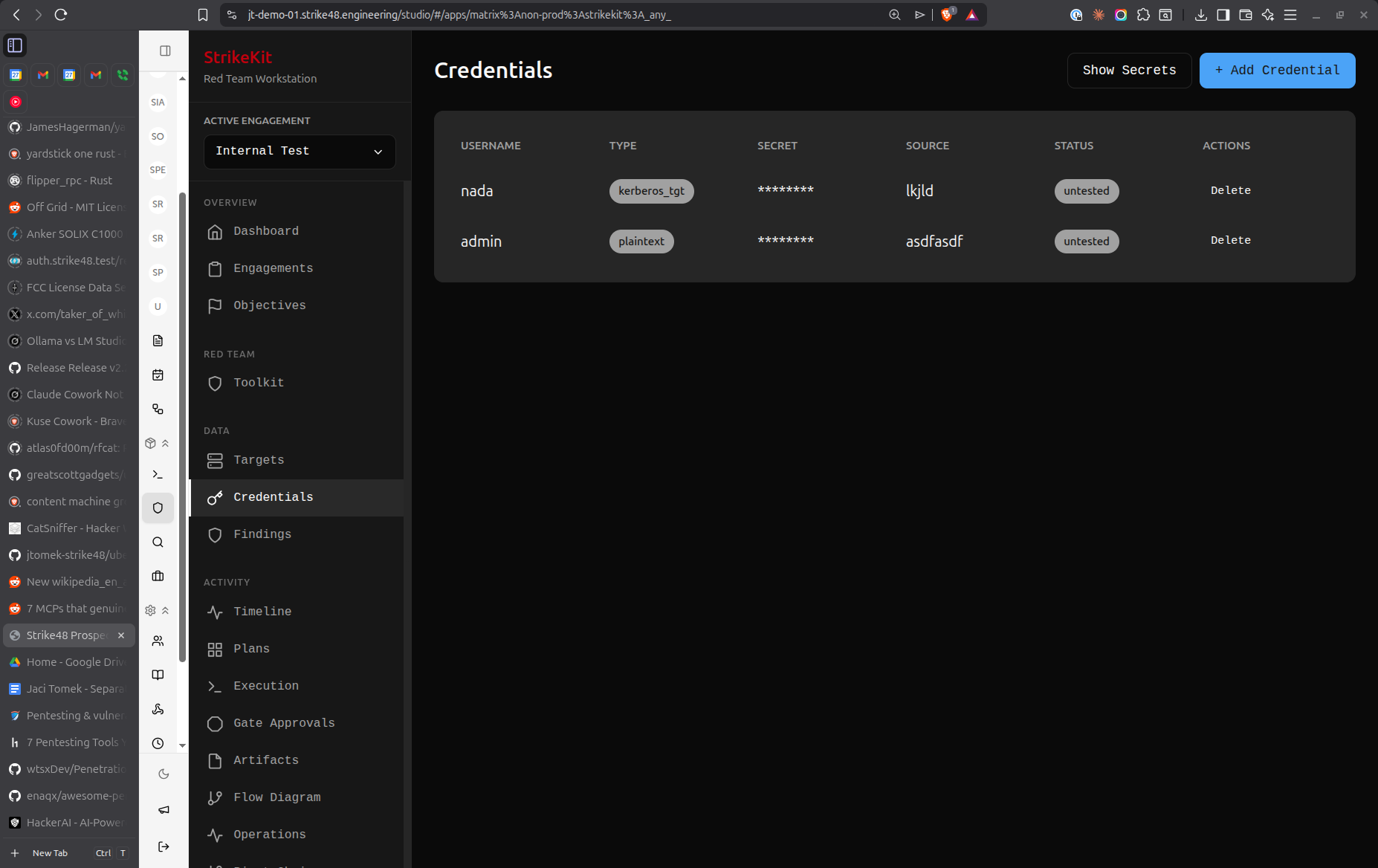 Credentials management interface showing discovered credentials
Creating Credentials
- Navigate to Analysis → Credentials
- Click Create Credential
- Fill in credential details
Credential Types
Username/Password
Standard authentication credentials:
- Username: Account name
- Password: Plaintext password
- Domain: AD domain or local system
Example:
Username: administrator
Password: P@ssw0rd123
Domain: CORP
Password Hash
Encrypted or hashed passwords:
- Username: Account name
- Hash: Hash value
- Hash Type: NTLM, SHA256, bcrypt, etc.
Example:
Username: admin
Hash: 5f4dcc3b5aa765d61d8327deb882cf99
Type: MD5
API Token
API keys and bearer tokens:
- Service: API service name
- Token: Token value
- Scope: Permissions or access level
Example:
Service: AWS
Token: AKIAIOSFODNN7EXAMPLE
Scope: s3:ReadOnly
SSH Key
SSH private keys:
- Username: SSH user
- Key: Private key content
- Passphrase: Key passphrase (if encrypted)
Example:
Username: root
Key: -----BEGIN RSA PRIVATE KEY-----
     [key content]
     -----END RSA PRIVATE KEY-----
Passphrase: [if applicable]
Certificate
Digital certificates:
- Subject: Certificate subject
- Thumbprint: Certificate identifier
- PFX/PEM: Certificate file content
Credential Fields
Required Fields
Type: Username/Password, Hash, Token, SSH Key, Certificate
Value: The actual credential (password, hash, token, key)
Important Fields
Username: Account name or identifier
Domain: Windows domain, LDAP directory, or system name
Source: Where credential was discovered
- Configuration file
- Memory dump
- Network traffic
- Database
- User input
- Password manager
- Web browser
Target: Which target this credential works on
Privilege Level:
- User
- Administrator
- System/Root
- Domain Admin
- Enterprise Admin
Status:
- Untested
- Valid
- Invalid
- Expired
- Changed
Optional Fields
Description: Notes about the credential
Examples:
- "Found in web.config file"
- "Extracted from LSASS memory"
- "Discovered in database backup"
Notes: Additional information
- Password complexity
- Last tested date
- Usage restrictions
- Related credentials
Tags: Organize credentials
Examples:
- critical
- domain-admin
- service-account
- local-admin
- api-key
Auto-Extraction
Credentials are automatically extracted from:
C2 Command Output
net useroutput/etc/shadowdumps- Mimikatz output
- LaZagne results
- Browser password dumps
Configuration Files
web.configfiles.envfiles- Database connection strings
- Application config files
Manual Import
- Paste credential lists
- Import from CSV
- Import from password managers
Credential Testing
Test Credentials
Verify credential validity:
- Select credential from list
- Click Test Credential
- Choose target to test against
- View test results
- Status updates automatically
Testing Methods
SMB/RPC: Windows network authentication
Test against: Domain controllers, file servers
Validates: Domain credentials
SSH: Unix/Linux remote access
Test against: Linux hosts
Validates: SSH credentials
RDP: Windows remote desktop
Test against: Windows workstations/servers
Validates: Local or domain credentials
Database: Database authentication
Test against: SQL Server, MySQL, PostgreSQL
Validates: Database credentials
API: API authentication
Test against: REST APIs
Validates: API tokens
Linking Credentials
To Targets
Associate credentials with targets:
- In credential details, select Add Target
- Choose target(s) where credential works
- Specify privilege level on each target
- Credential appears in target's credential list
Benefits:
- Track which credentials work where
- Identify reused passwords
- Plan lateral movement
- Generate credential maps
To Findings
Link to related vulnerabilities:
- When documenting finding, reference credential
- Show how credential was obtained
- Demonstrate impact of credential exposure
- Link to remediation recommendations
Credential Reuse
Identifying Reuse
StrikeKit helps identify credential reuse:
Same Password, Multiple Accounts:
- Highlights accounts using identical passwords
- Shows scope of password reuse
- Prioritizes for security findings
Working on Multiple Targets:
- Tracks which targets accept the same credential
- Visualizes lateral movement opportunities
- Shows blast radius of compromise
Exploiting Reuse
When credential reuse is identified:
- Document as finding (weak security practice)
- Test credential on other discovered targets
- Track successful lateral movement
- Update pivot chains
- Document in kill chain progression
Credential Organization
By Type
Filter by credential type:
- Passwords only
- Hashes only
- API tokens
- SSH keys
By Status
Filter by validation status:
- Valid (confirmed working)
- Untested (not yet verified)
- Invalid (confirmed not working)
- Expired (no longer valid)
By Privilege
Filter by privilege level:
- Administrator/Root
- Domain Admin
- User-level
- Service accounts
By Target
View credentials by associated target:
- Show all credentials for specific host
- Group by domain/system
- Filter by network segment
Search
Search by:
- Username
- Domain
- Source
- Description
- Tags
Security Practices
Storage Security
StrikeKit stores credentials securely:
- Database encryption at rest
- No plaintext in logs
- Masked display by default
- Access logging
Handling Guidelines
- Minimize exposure: Only access credentials when needed
- Don't reuse: Never use discovered credentials for non-authorized purposes
- Secure transmission: Use encrypted channels when sharing
- Document carefully: Note where found and how obtained
- Responsible disclosure: Include in findings with remediation
Legal Considerations
- Only use within scope of engagement
- Follow client's data handling requirements
- Secure storage after engagement
- Proper disposal per agreement
- Include in final report
Reporting
Credential Findings
Document credential-related vulnerabilities:
Weak Passwords:
- Common/default passwords
- Dictionary words
- Keyboard patterns
- Company name variations
Credential Exposure:
- Plaintext in configuration files
- Hardcoded in source code
- Stored in browser
- Transmitted unencrypted
Credential Reuse:
- Same password across accounts
- Shared service accounts
- Personal passwords on corporate systems
Insufficient Protection:
- Weak hashing algorithms
- No password complexity requirements
- No account lockout policy
- Password never expires
Evidence Collection
For each credential finding, include:
- Screenshot showing where found
- Command output or file content
- Demonstration of validity
- Scope of access granted
- Reuse analysis
Best Practices
Documentation
Record complete information:
Good:
Username: sqlsvc
Password: P@ssw0rd123
Domain: CORP
Source: Found in web.config on webserver01
Privilege: db_owner on SQLPROD
Tested: Valid on 2026-01-15
Notes: Service account for web app database connection

Avoid:
Username: admin
Password: password
Testing
Test systematically:
- Test credential against original source
- Test against similar targets
- Test for lateral movement
- Test for privilege escalation
- Document all test results
Prioritization
Focus on high-value credentials:
- Domain Admin: Full domain control
- Enterprise Admin: Forest-wide access
- Local Admin on multiple hosts: Lateral movement
- Service accounts: Often over-privileged
- API keys with broad scope: Data access
Credential Mapping
Create visual maps showing:
- Which credentials work on which targets
- Privilege levels per target
- Lateral movement paths
- Privilege escalation paths
Common Workflows
Initial Discovery
- Discover credential via reconnaissance or exploitation
- Create credential entry immediately
- Mark as "Untested"
- Document source clearly
- Add relevant tags
Credential Testing
- Select untested credential
- Test against original target
- Update status based on results
- If valid, test against other targets
- Document all test results
- Create findings for vulnerabilities
Lateral Movement
- Review valid credentials
- Identify potential targets
- Test credentials against targets
- Document successful access
- Mark targets as compromised
- Create pivot chain entries
- Update kill chain
Report Preparation
- Filter by "Valid" status
- Review all discovered credentials
- Group by type and privilege level
- Create findings for:
- Weak passwords
- Credential exposure
- Credential reuse
- Insufficient protection
- Include credential statistics in report
Tips
- Document immediately: Record credentials as you find them
- Test systematically: Don't assume credentials work everywhere
- Track privilege: Note what access each credential provides
- Look for patterns: Password patterns reveal policy weaknesses
- Check reuse: Always test credentials on other targets
- Protect carefully: Handle credentials securely
- Link everything: Connect credentials to targets, findings, and sources
- Note expiration: Track if credentials expire or change
- Service accounts: Often most valuable for persistence
- Hash formats: Correctly identify hash types for cracking attempts
Troubleshooting
Credential Not Working
If credential tests invalid:
- Verify correct format (domain\username vs username@domain)
- Check for special characters in password
- Verify privilege level
- Check account status (locked, disabled, expired)
- Test against different services
- Consider account lockout policy
Hash Cracking
For password hashes:
- Identify hash type correctly
- Use appropriate cracking tool (hashcat, john)
- Apply appropriate wordlists
- Consider rules and mutations
- Document cracked passwords
API Token Issues
For invalid API tokens:
- Check token format
- Verify token scope
- Check expiration
- Test correct API endpoint
- Review authentication method
Related Features
- Targets - Link credentials to targets
- Findings - Document credential-related vulnerabilities
- Pivot Chains - Use credentials for lateral movement
- C2 - Auto-extract from C2 output
- Evidence - Store credential discovery proof
Next Steps
After collecting credentials:
- Test Against Targets - Verify where credentials work
- Track Lateral Movement - Use for pivoting
- Document Findings - Record credential-related vulnerabilities
- Create Evidence - Screenshot credential discovery
- Generate Reports - Include credential analysis in deliverables
Related Documentation:
- C2 Operations - Auto-extract from C2 output
- Targets - Link credentials to systems
- Findings - Document credential exposure
Video Tutorial
📹 Coming Soon: Complete credential management workflow
Quick Demos
🎬 GIF: Adding credentials manually 🎬 GIF: Testing credentials against targets 🎬 GIF: Identifying credential reuse