

 Kill Chain
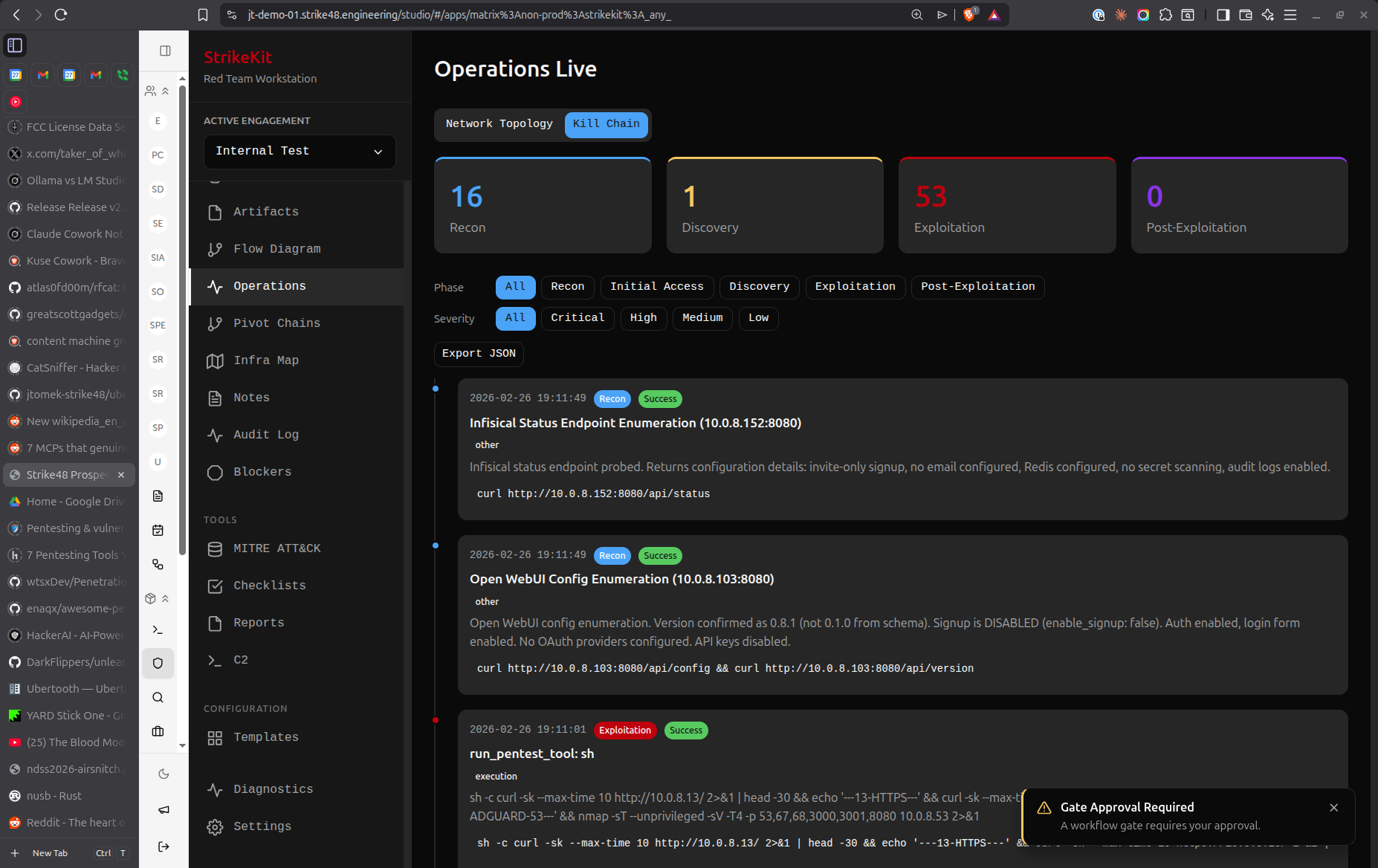 Kill Chain showing attack phase progression with collapsible activity timelines
Attack Phases
1. Reconnaissance
Initial information gathering and target identification:
Activities in this phase:
- OSINT collection
- Domain enumeration
- Network scanning
- Service fingerprinting
- Employee enumeration
- Social media reconnaissance
MITRE ATT&CK Categories:
- Reconnaissance
- Resource Development
2. Discovery
Internal reconnaissance after gaining initial access:
Activities in this phase:
- Network discovery
- Service enumeration
- Credential access attempts
- Data collection
- Account discovery
- Permission enumeration
MITRE ATT&CK Categories:
- Discovery
- Credential Access
- Collection
3. Exploitation
Active exploitation and privilege escalation:
Activities in this phase:
- Initial access attempts
- Exploit execution
- Privilege escalation
- Vulnerability exploitation
MITRE ATT&CK Categories:
- Initial Access
- Execution
- Privilege Escalation
4. Post-Exploitation
Maintaining access and achieving objectives:
Activities in this phase:
- Persistence mechanisms
- Defense evasion
- Lateral movement
- Command and control
- Data exfiltration
- Impact operations
MITRE ATT&CK Categories:
- Persistence
- Defense Evasion
- Lateral Movement
- Command and Control
- Exfiltration
- Impact
Using the Kill Chain View
Overview Cards
At the top of the Kill Chain view, four cards display:
- Phase name with color-coded badge
- Activity count for that phase
- Percentage of total activities
- Progress bar showing relative activity volume
Color Coding:
- Reconnaissance: Blue (info badge)
- Discovery: Yellow (warning badge)
- Exploitation: Red (error badge)
- Post-Exploitation: Gray (secondary badge)
Activity Timeline
Below the overview cards, each phase shows a collapsible timeline:
-
Click the phase header to expand/collapse
-
Expanded view shows:
- Activity description (truncated to 100 characters)
- Timestamp (e.g., "Jan 15, 2026 at 3:45 PM")
- Activity number within the phase (#1, #2, #3...)
-
Default state: All phases expanded
Filtering
Activities are automatically categorized by their MITRE ATT&CK category:
- Each activity has a category (e.g., Discovery, Lateral Movement)
- Category maps to a Kill Chain phase
- Activities appear only in their assigned phase
Interpreting the Kill Chain
Balanced Progression
A typical engagement shows activity in all phases:
Recon:            ████████░░ 35%
Discovery:        ██████░░░░ 25%
Exploitation:     ████░░░░░░ 15%
Post-Exploit:     ██████░░░░ 25%
This indicates:
- Thorough reconnaissance
- Adequate discovery
- Successful exploitation
- Good post-exploitation coverage
Warning Signs
Too much Recon, not enough Exploitation:
Recon:            ██████████ 70%
Discovery:        ███░░░░░░░ 15%
Exploitation:     ██░░░░░░░░ 10%
Post-Exploit:     █░░░░░░░░░  5%
- May indicate difficulty gaining access
- Could suggest need for different tactics
- Consider reviewing blockers
Skipping phases:
Recon:            ████████░░ 40%
Discovery:        ░░░░░░░░░░  0%
Exploitation:     ██████░░░░ 30%
Post-Exploit:     ██████░░░░ 30%
- Missing discovery phase is unusual
- May indicate incomplete documentation
- Ensure activities are properly categorized
Best Practices
Document All Activities
Every significant action should be recorded:
- Create activities as you work
- Assign correct MITRE ATT&CK categories
- Activities automatically appear in Kill Chain
- Provides complete audit trail
Review Progression Regularly
Check the Kill Chain view:
- Daily: During active operations
- End of day: Review what phases you worked in
- Weekly: Ensure balanced coverage
- End of engagement: Verify complete lifecycle coverage
Use for Reporting
The Kill Chain view is valuable for:
- Executive summary: Show attack progression visually
- Methodology section: Demonstrate systematic approach
- Findings context: Explain where in the attack lifecycle findings occurred
- Debrief: Walk client through your attack path
Activity Descriptions
Write clear, concise descriptions:
Good:
- "Performed nmap scan of 192.168.1.0/24"
- "Discovered domain admin credentials in SYSVOL"
- "Exploited CVE-2023-12345 on web server"
- "Established persistence via scheduled task"

Avoid:
- "Scanned stuff"
- "Found creds"
- "Exploited a thing"
Common Patterns
External Pentest
Typical progression:
- Heavy Recon (40-50%): OSINT, scanning, service enumeration
- Light Discovery (10-15%): Limited internal access
- Moderate Exploitation (20-30%): Focus on gaining access
- Light Post-Exploit (15-20%): Limited internal movement
Internal Assessment
Typical progression:
- Light Recon (10-15%): Internal network already accessible
- Heavy Discovery (30-40%): Extensive enumeration
- Moderate Exploitation (20-25%): Privilege escalation
- Heavy Post-Exploit (30-40%): Lateral movement, persistence
Web Application Test
Typical progression:
- Moderate Recon (25-30%): App fingerprinting, endpoint discovery
- Light Discovery (10-15%): Limited backend visibility
- Heavy Exploitation (50-60%): Vulnerability testing
- Light Post-Exploit (5-10%): Limited persistence options
Differences from Timeline
Kill Chain and Timeline serve different purposes:
| Kill Chain | Timeline |
|---|---|
| Groups by attack phase | Orders by time |
| Shows progression through lifecycle | Shows chronological events |
| Activity-focused | Milestone-focused |
| Tactical view | Strategic view |
Use both together:
- Kill Chain: Understand attack methodology
- Timeline: Track when things happened
Export and Reporting
Kill Chain data appears in generated reports:
- Overview cards show phase distribution
- Activity counts demonstrate thoroughness
- Visual representation of attack progression
- Links to detailed activity descriptions
Tips
- Tag activities immediately: Don't batch-create activities at the end
- Use correct categories: Accurate categorization ensures proper Kill Chain grouping
- Expand phases during review: Check activity descriptions for completeness
- Compare to methodology: Ensure you're not missing steps in your checklist
- Show to stakeholders: Kill Chain is intuitive for non-technical audiences
Related Features
- Timeline - Chronological event tracking
- Audit Log - Detailed action history
- MITRE ATT&CK - Technique mapping
- Activities - Activity management